
Documentation - Start here
Getting started with Checkstep
Your first login, the four dashboards, and how everything connects - so you know exactly where you are and what to do next.
What Checkstep does
Checkstep is an AI-powered content moderation platform. It scans user-generated content against your policies, flags potential violations, routes them for review, and handles the compliance reporting that regulations require - all from a single system.
If you're responsible for Trust & Safety, content moderation, or policy enforcement on a platform where users create and share content, Checkstep replaces the patchwork of manual review, basic keyword filters, and spreadsheet-based compliance tracking with an integrated pipeline that scales.
The platform is built around a simple principle: your policies are the source of truth.You define what's allowed and what isn't. Checkstep's AI, moderation tools, and compliance automation all exist to enforce those policies consistently and at scale.
How it works - the 30-second version
Every piece of user-generated content that enters your platform flows through the same pipeline.
Content arrives via Checkstep's API. AI models scan it and assign confidence scores based on your policies. High-confidence violations can be automatically enforced. Borderline content gets routed to human moderators (or an advanced AI bot called ModBot) for review. Every action generates compliance records and user-facing notifications automatically.
Most of your time in Checkstep will be spent in one of four dashboards - each one handles a different stage of this pipeline.
The four dashboards
Checkstep is organized around four core areas. Think of them as four rooms - each serves a different purpose, and together they cover the full moderation lifecycle.
Policy Dashboard
Where you define what you stand for as a business. Upload your brand policy guidelines, set your specific content policies (hate speech, sexual content, spam, and any custom categories), and configure the rules that connect your policies to AI detection.
Moderation Dashboard
Where flagged content lands for human review. Your moderators see the content, its context, the AI's reasoning for flagging it, and take actions - remove, ban, escalate, or approve. Includes tools to protect moderator wellbeing like blurred imagery and greyscale previews.
Compliance Dashboard
Where enforcement meets regulation. Moderation actions automatically generate compliance reports for the EU Digital Services Act and UK Online Safety Act. Users are notified through a Transparency Portal showing what was removed, why, and how to appeal.
Reporting Dashboard
Where you see the big picture. Incident volumes, enforcement rates, moderator throughput, decision accuracy, and quality assurance metrics. Use this to understand how your moderation operation is performing and where to adjust.
Key vocabulary
Checkstep uses some terms in specific ways. Knowing these upfront will make everything else in the docs (and in the platform) make more sense.
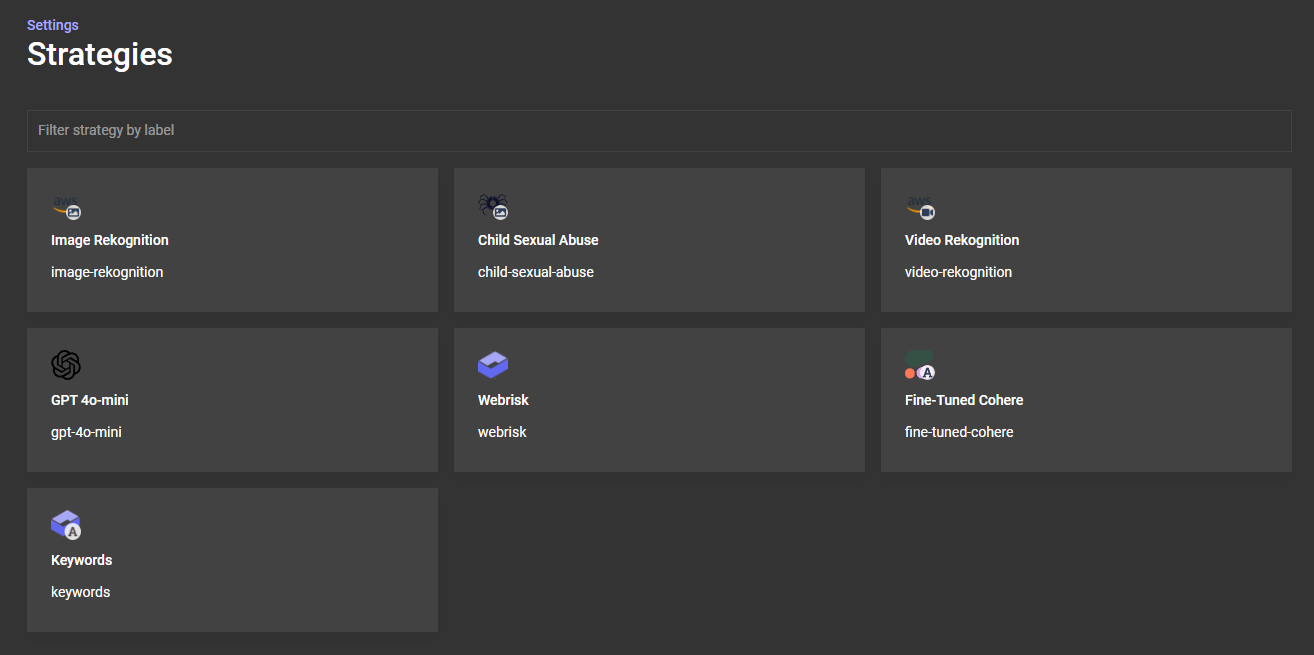
Settings → Strategies and are configured globally across your account. Rules live inside individual policies. Strategies produce labels; rules decide what to do with them. This separation trips up many new users - if you remember nothing else from this section, remember this.What Checkstep can scan
Checkstep handles the full range of user-generated content types. You connect via API and choose which models to run on each type.
Checkstep only runs models on content types they're designed for - a text-only message won't consume image recognition credits. Most accounts need four to five active models to cover their content mix. Checkstep's forecasting tools help you estimate AI credit usage so you know what to expect before going live.
Your first session in the platform
You've logged in. Here's what to orient yourself around before touching any settings.
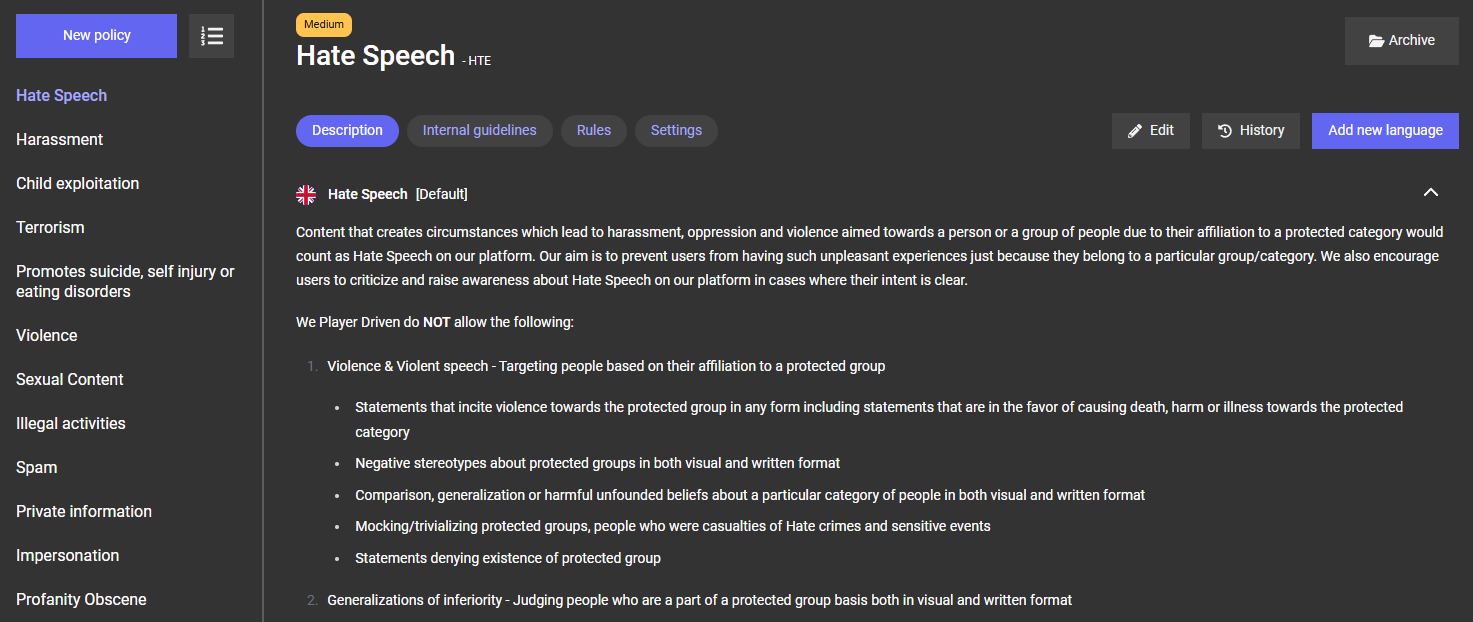
1. Look at the Policy Dashboard
If your account was provisioned by Checkstep's onboarding team, you may already see some policies pre-loaded - these are reference templates based on common moderation categories. If your account is empty, that's expected too. Either way, this is home base.
2. Check Settings → Strategies
Navigate to Settings → Strategies to see which AI models are active on your account. Your account may have been pre-configured with a standard set - typically image recognition, a CSAM detection model, an LLM strategy for text, and keywords. These are the tools that will scan your content.
3. Browse a policy
Click into any policy to see its three layers: the Description (public text), Internal Guidelines (moderator context), and Rules(AI + thresholds). Don't change anything yet - just understand the structure. Every policy you create will follow this same three-layer pattern.

4. Look at the Moderation Dashboard
Even before you have live content, familiarize yourself with the Moderation Dashboard layout. This is where your moderators will spend their time - reviewing flagged content, seeing AI reasoning, and taking actions. Note the available actions (no action, enforce, suspend, escalate, etc.) - these are customizable.
The onboarding path
Getting from 'account provisioned' to 'live and moderating' follows a consistent sequence. Here's the full journey at a glance.
Each of these steps has its own guide. The next doc in this series - the Setup Checklist - walks you through steps 1–6 with interactive checklists you can track as you go. The Building Your Content Policies guide goes deep on step 1 and 2. And the Advanced Policy Configurationguide covers ModBot, LLM label tuning, and multi-policy architectures once you're live and optimizing.
Where to go next
You're oriented. Here's the recommended reading order.
| Guide | When to read it |
|---|---|
| Setup Checklist | Right now. Walk through each setup step with interactive checklists. This gets you from configured to live. |
| Building Your Policies | When you're ready to go deep on policy configuration - understanding strategies, writing rules, setting thresholds, and connecting everything. |
| Advanced Policy & ModBot | After you're live and want to optimize - better LLM labels, ModBot deployment, multi-policy architectures. |
If your account was set up by Checkstep's onboarding team and you already have policies and rules configured, you can skip straight to the Policy Building guide to understand what was set up and how to make changes.